
The Portfolio Optimizer: draft your whole portfolio with Magpie or by hand
The Portfolio Optimizer compares every account you hold against the benchmark from your own plan. Run it with Magpie or adjust it by hand in the Portfolio Workbench, and it proposes trades by account for you to review and place yourself. Nothing in the draft places a trade or changes what you hold. It is included in Premium at $15 a month, billed annually, or in Lifetime at $1,200 once. Free for 14 days.
You review every candidate trade and place it yourself. WealthFluent is software, not a financial advisor.

Two ways to work on the same draft
Open Magpie, the Workbench, or both. Magpie talks the draft through with you. The Workbench puts every position in front of you to edit by hand.
There is one draft behind both views, so a change made in one shows up in the other. Ask Magpie about an edit you just made, or change by hand what Magpie just proposed.
- Magpie view: the chat, the optimizer and the result explained in plain language
- Workbench view: every account and holding, with editable columns beside them
- Widgets: Full, Compact or Off, so the charts take as much of the screen as you want
- The Workbench is on desktop. On a phone the page is the chat and the widgets
The Workbench: your whole portfolio as a draft
A “what-if” version of everything you hold. Change it freely. Your accounts stay exactly as they are.
Edit any position
Change a holding by dollars, shares, new value or new allocation. Change one and the others follow.
Move cash and holdings
Move cash between accounts, add a security you don’t own yet, or move holdings to another account without selling them.
Try an account you don’t have
Add a taxable account, a traditional or Roth IRA, a 401(k) or a bank account to the draft. It is marked Hypothetical and exists only there.
Model a sale
See what selling a house, land, a vehicle or valuables would do: the selling costs, the loan paid off and where the rest goes.
Prices hold still
A draft is worked out against prices frozen when it started, so a number you type doesn’t drift as the market moves. Re-price it whenever you choose.
Save and come back
Each draft is named for when it started. Saved Revisions keeps them, so you can return to one later or compare ideas.
Run the optimizer, then read why
Run Optimizer in the Workbench and Optimize in the chat run the same analysis.

Measured against your own benchmark
The optimizer compares your holdings with the benchmark from your Lifetime Wealth Plan and writes candidate trades into the draft, with specific funds, share counts and dollar amounts.
It works across all your accounts at once, and Magpie explains each step.
Your rules come first
Hard constraints are rules it must honor, such as “do not sell” a position. Soft preferences are things it should lean toward.
Add them yourself or set them up in the chat. Magpie can also propose some. Nothing is applied until you approve it.
See what moved and what didn’t
After a run you see how far the draft closed the gap to your benchmark, and a list of holdings left where they were with the reason: a constraint you set, the only holding in its account, or an account type the optimizer doesn’t trade.
It will not put more than 70% of an account into one individual security. Diversified funds have no limit.
Optimize for Tax Location
After a run, Magpie can work out which account each holding is best held in. It keeps the same securities and dollar amounts and changes only where they sit, so your allocation stays the same.
Each move is a sale and a purchase inside the same account. In taxable accounts, realized gains are held to a threshold that starts at $0. Nothing happens until you say yes to the plan.
Your trade list, ready to place.
When you’re ready to act on a draft, Create tasks list turns it into a checklist in your Task Manager: every trade, security by security and account by account, with the sells first. Export to PDF saves the same plan with share counts and dollar amounts.
You place those trades at your own institution. WealthFluent never executes a trade and never holds your assets. Your accounts stay exactly where they are, connected read-only.
The Portfolio Optimizer does the analysis. The trades, and the decision to make them, remain entirely yours.
- Every trade laid out security by security, account by account
- You place the trades at your own institution
- WealthFluent never executes a trade and never holds your assets
- Accounts stay where they are, connected read-only
Talk the draft through with Magpie
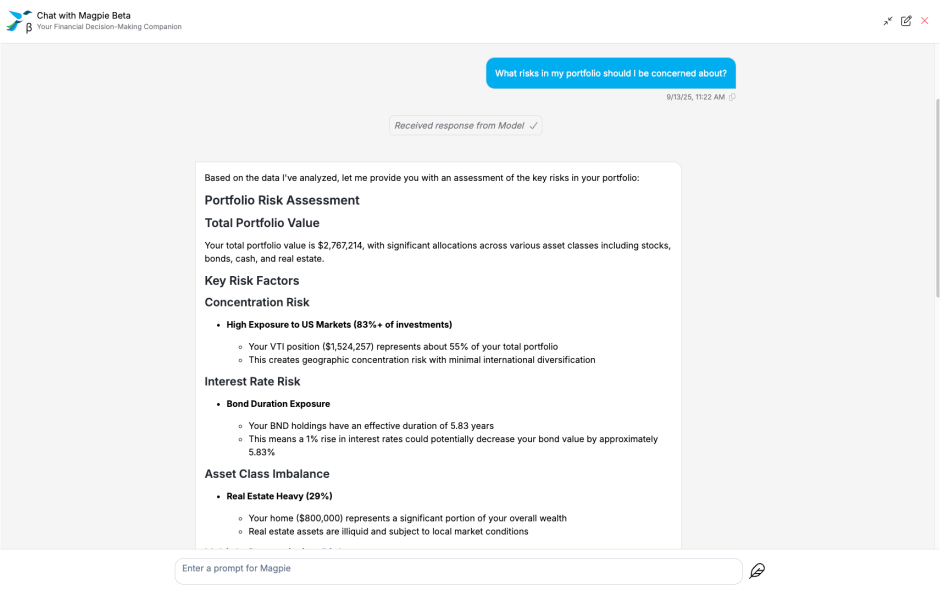
Magpie is built into the Portfolio Optimizer and works from your own accounts, goals and plan. Ask it why a trade is in the draft, what is driving the gap to your benchmark, or what a change would do to your allocation.
It explains portfolio risk and asset allocation with your whole balance sheet in view, including pensions, real estate and liabilities. Its answers come with the numbers behind them and buttons for the next question.
The analytics behind the draft
The allocation table shows Current, In Progress and Benchmark side by side for stocks, bonds, cash and real assets, with portfolio beta and duration. Largest Deviation shows where the draft still sits furthest from your benchmark. Yields & Expenses compares income and fund costs for each.
The Efficiency Gap puts one number on it: the share of your portfolio that sits differently from your plan. It lists where the difference is, by bond sector, credit quality, bond maturity and asset mix, and compares your portfolio’s beta and duration with the plan’s.
Key Rate Durations (KRDs) measure bond price sensitivity to targeted yield shifts across maturities, so you can see how a steeper or flatter curve would affect your bonds.
For the market side, including the yield curve, VIX® and forward-looking sector analysis, see Markets.
Measure Performance Like the Pros
WealthFluent uses a Fully Dynamic Investable Benchmark derived from your Lifetime Wealth Plan.
You can evaluate portfolio performance in the professional way with a Net of Benchmark Performance. This lets you understand the impact of past decisions as you navigate the next one.

Draft it, test it, then place the trades yourself
Connect your accounts read-only and see candidate trades measured against your own benchmark.
For how DIY investors close the plan-to-portfolio gap across 401(k), IRA and taxable accounts, see that how-to.
Free 14-day trial. Cancel anytime. The Portfolio Optimizer is included with Premium and Lifetime. Holdings is fully functional on every plan, including Essentials.
WealthFluent is not a financial advisor and does not provide investment advice. Platform analytics are tools for informed decision-making. Optimizer output is educational modeling. You review every candidate trade and place trades yourself at your own institution.